
Online applications

Registration for online access
If you've previously registered on our website, please log in with your username and password using the 'Adviser login'. New users can register through our simple self-registration process.
To register, click the Adviser login button. Please note, you'll need to complete a Terms of Business agreement for your firm before placing any new business. You can contact our office on 0115 841 5000 for more information.
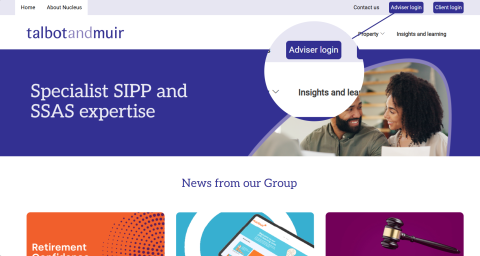
Click 'register' and complete all fields as fully and accurately as possible, as this information will be used on your clients' application forms. Details can be amended within the application form if required.
Once you've submitted your registration, you'll receive an email containing a password. For security purposes, this password must be changed immediately.
Online applications for clients
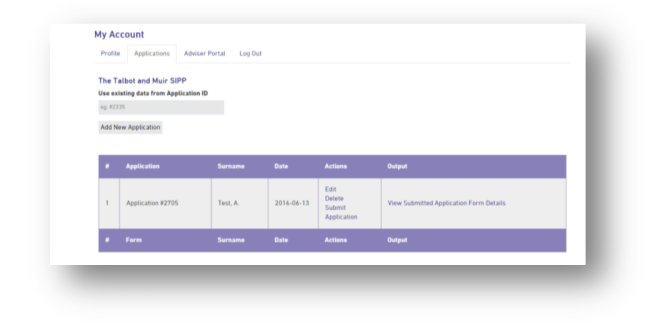
- Login to the Adviser Portal, click the 'applications' tab and 'add new application'.
- Complete the client's information online and save as you progress.
- Once you're happy all information has been entered correctly, click 'save'. Then return to the application list and hit 'submit application'.
- A copy of the application will be sent to the client along with their cooling off notice. You can also view and print a copy for your records.
- Please note, you'll need to provide a completed declaration form too. We can accept electronic signatures where an e-sign agreement is in place with your firm. Alternatively please send us a paper copy with a wet signature. We can accept a scan of this whilst we await the original.
- We also require any relevant forms to be completed, such as investment or ceding scheme forms, before we can process the SIPP.
To set up an e-sign agreement with your firm, please contact us.
Viewing your existing clients online
Once you've registered for an account, we can link any existing SIPP clients to your profile, so you can view their plans online. Simply contact us and we'll be happy to help.